Sometimes a video has the perfect background track, a hilarious voiceover, or an unreleased remix, and you just want to keep it. The problem is, these original sounds usually aren't on Spotify or Apple Music. If you want to use them in your own video edits, set them as a ringtone, or just listen offline, you need to save the file directly.
How to Download TikTok Audio (Any Device)
SaveThat.video is a free, browser-based TikTok sound downloader. There is no app to install, no account to create, and no browser extension required. As long as you have a web browser and an internet connection, it works universally.
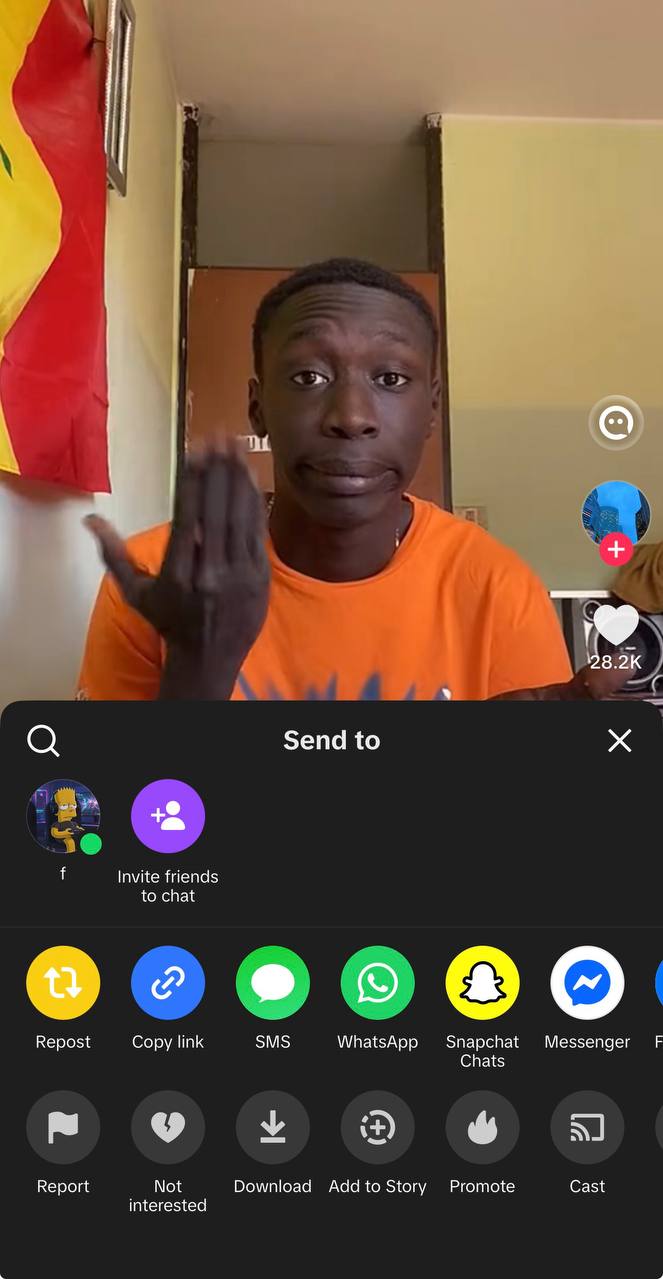
Step 1: Copy the TikTok link
Open the app, locate your video, tap the Share button (the arrow icon), and select Copy link.
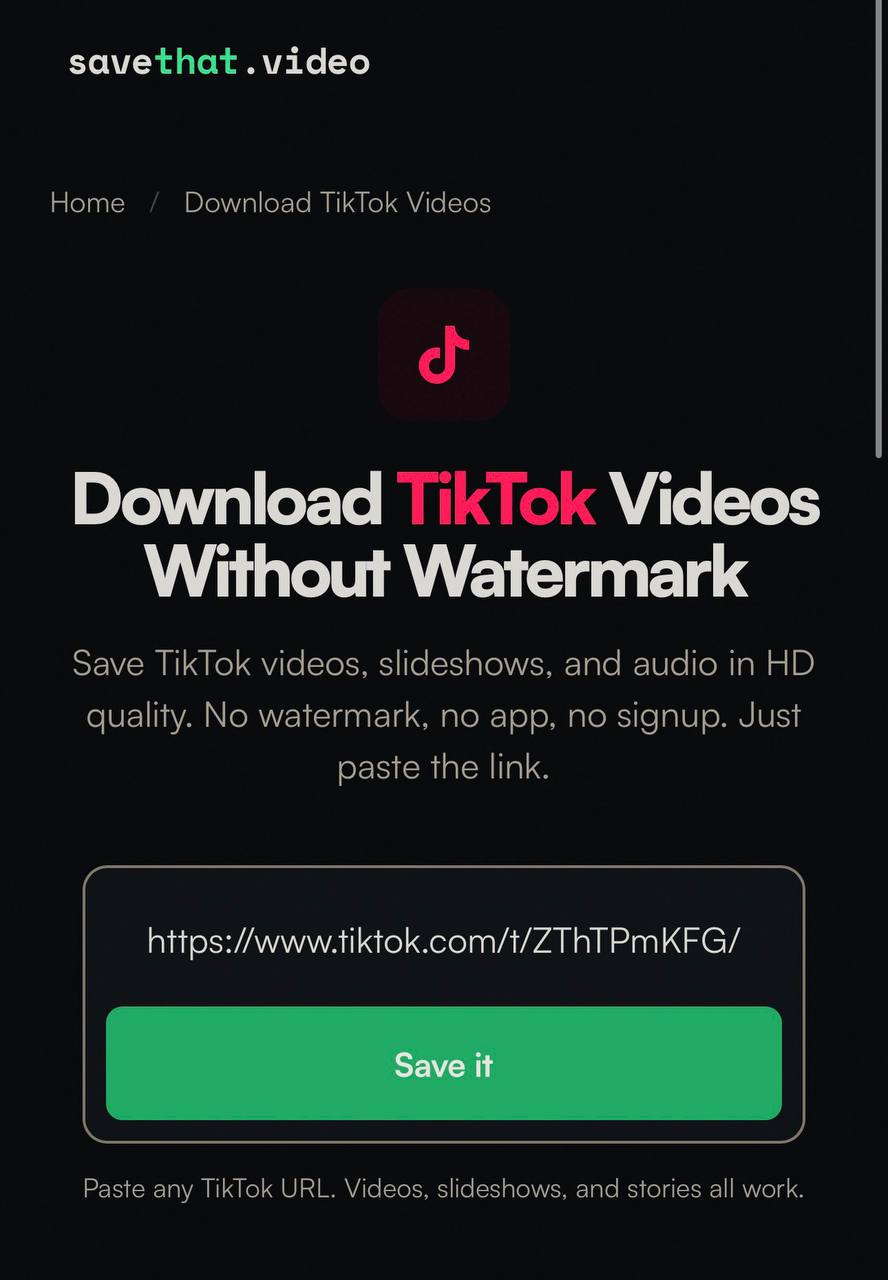
Step 2: Paste into SaveThat.video
Open your web browser, navigate to SaveThat.video, paste the copied URL into the search box, select Audio only mode, and tap Save it.
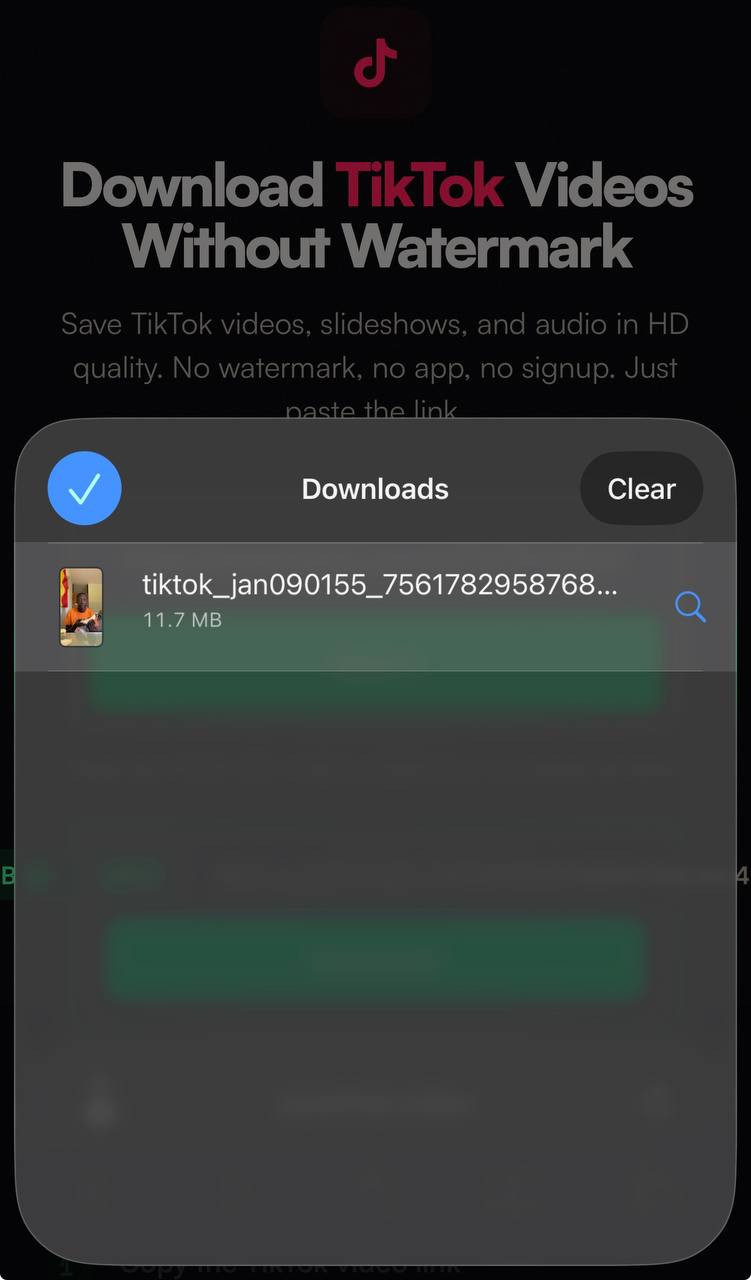
Step 3: Download the audio file
The tool processes the link and returns an MP3 file. Tap the download button to save it directly to your device. No conversion needed.
Save TikTok Audio on iPhone
If you want to know how to download TikTok audio on iPhone, the most reliable method is using Safari. Apple's native browser has a built-in download manager that handles media files perfectly.
Follow the basic steps above: copy your link, paste it into SaveThat.video, and select Audio only. When you tap the download button, Safari will trigger a popup asking you to confirm the action. Tap Download.
The file saves directly to your iPhone's Files app, specifically inside the Downloads folder. You can find this by opening the blue Files folder on your home screen and navigating to "On My iPhone" or "iCloud Drive," depending on your settings.
Tip: Occasionally, Safari will try to play the audio file on a new screen instead of downloading it. If that happens, hit the back button, long-press the download button on our site, and tap Download Linked File. This forces Safari to save the track. You can also use this exact Safari method to save TikTok videos on iPhone if you need the visual content too.
Save TikTok Audio on Android
Saving TikTok sounds on Android is incredibly fast because the operating system uses an open, accessible file structure. Google Chrome is the best browser for the job.
Run your copied link through SaveThat.video, select Audio only, and tap Save it. Chrome will instantly pull the MP3 and route it straight to your device's primary Downloads folder.
Because Android doesn't restrict media access, your third-party music player apps usually pick up these files automatically. You can open your default music app, and the new track will likely be sitting right there in your recent additions. If you are doing heavy media gathering, you can also download TikTok videos on Android to keep both the video and the audio tracks intact.
Save TikTok Sounds on PC or Mac
The browser method is identical on a desktop computer. Open Chrome, Safari, or Edge, paste your copied URL into SaveThat.video, and hit the download button.
Desktop browsers are heavily optimized for streaming, so clicking a direct MP3 link might open a new tab that just plays the track out loud. If the browser tries to play the file instead of saving it, simply right-click the download button and choose Save As (or Download Linked File on Mac). This prompts your computer to open a standard file dialogue window so you can choose exactly where to store the track.
Our site also functions perfectly as a standard TikTok video downloader when you are working from a desktop.
How to Find the Original Sound on TikTok
Often, the video you are watching features a creator talking or adding loud sound effects over the background track you actually want. If you want to extract audio from TikTok cleanly, you need to grab the source file.
Tap the spinning record icon in the bottom-right corner of any video. This opens the dedicated Sound Page, which aggregates all videos currently using that specific piece of audio.
Instead of copying the link to the video you were just watching, tap the Share arrow on the Sound Page and select Copy link. You can paste this Sound Page URL directly into our downloader. This bypasses the overlapping dialogue and pulls the cleanest, unedited version of the audio track from the platform's servers.
What Audio Format and Quality to Expect
When you save TikTok music, it is important to know what you are getting. The platform compresses all uploads to ensure videos stream quickly on mobile networks.
When you select Audio only mode, you get an MP3 at around 128kbps. This is perfectly fine for mobile listening and is functionally identical to the standard streaming quality on apps like Spotify. The file plays on any device without requiring additional conversion software.
If you need lossless, studio-quality sound for a professional project, you need to buy the track from a dedicated music platform. Everything pulled from a social feed is compressed. However, this compression means the files are incredibly small. A 15-second clip takes up about 0.25 MB, while a full 60-second sound is roughly 1 MB. You won't drain your phone's storage space downloading these tracks.
Using Saved TikTok Audio in Other Apps
Once the file is saved to your phone, importing it into a mobile video editor is a seamless process.
CapCut
To use your downloaded track in CapCut, open your project timeline and tap Audio in the bottom menu. Select Sounds, then tap the small folder icon to access your local files. Choose From device, locate your saved track, and tap the plus icon to drop it directly onto your timeline.
iMovie
For Apple users editing in iMovie, tap the + button on your project screen to add new media. Select Files, navigate to your Downloads folder, and tap the saved audio track. iMovie imports it instantly as a background audio layer.
Video editors on Android
Apps like InShot, VN, and KineMaster follow a similar path. Open your project, tap your audio or music tab, and look for an import option labeled Local or Imported. Since Android apps can see your device's Downloads folder, your new sound will be ready to select.
If you already downloaded a full video and just need to strip the sound from it for an edit, you can run it through a TikTok to MP3 converter.
Is It Legal to Download TikTok Audio?
Downloading these audio tracks for personal use, like listening offline or sharing a funny clip in a private text thread, is generally fine. However, commercial use of copyrighted music is strictly prohibited without a license. You cannot save a popular pop song and use it in a paid advertisement. Original creator sounds (like someone telling a story or playing a riff) exist in a grey area, so you should always credit the original creator if you use their audio publicly.
If you are archiving content, you might also want to download TikTok without watermark to keep your saved files clean.